

String Helper for VBA – 19 Functions for Text in MS Access
Strings are everywhere – during import, reporting and text processing. Instead of constantly juggling substring, trim and replace, you get a toolbox of 19 VBA string functions here: fast, elegant and error-free, testable directly via a form interface.
If you work with VBA, you know the drill: strings are everywhere – during import, reporting, data preparation and text processing. And every time it’s substring here, trim there, replace over there. That ends now: a toolbox of 19 string functions, fast, elegant and error-free.
What makes them special?
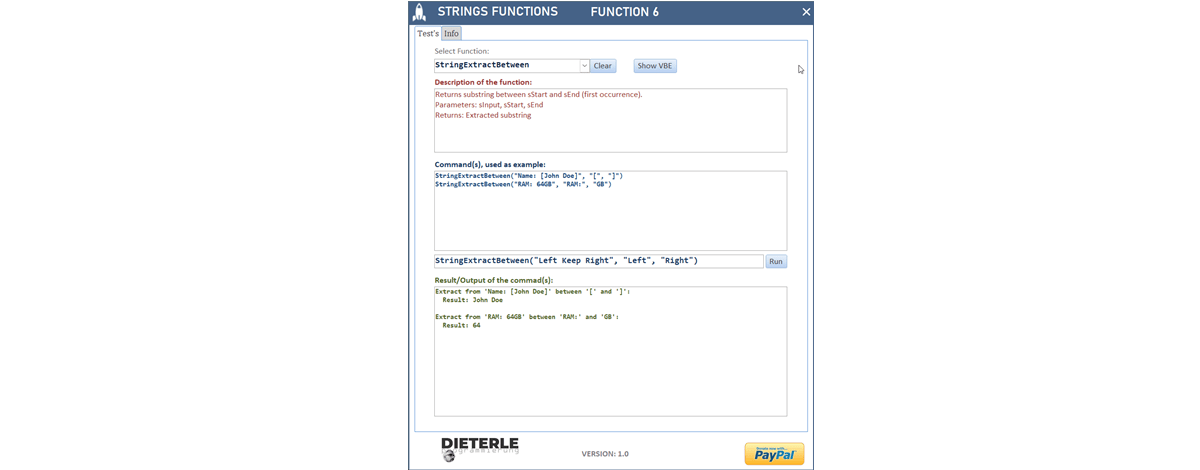
Every function is directly testable via an integrated form interface. You see the result immediately, check your own inputs and combine functions as you like – maximum flexibility, less debugging.
All 19 functions at a glance
| Function | Description | Example |
|---|---|---|
StringFixLength | Fixed length – too long is truncated, too short is padded. | StringFixLength("ABC", 6, "_") → "ABC___" |
StringCombine | Joins strings with a freely selectable separator. | StringCombine("FirstName", "LastName", " ") → "FirstName LastName" |
StringRemoveTrailingChars | Removes characters at the end of a text. | StringRemoveTrailingChars("Test, ", ", ") → "Test" |
StringRemoveChars | Deletes specific characters throughout the string. | StringRemoveChars("12-34-56", "-") → "123456" |
StringRemoveWords | Removes specified words from a text. | StringRemoveWords("This is a test text", "test text") → "This is a" |
StringExtractBetween | Extracts text between two markers. | StringExtractBetween("Hello [World]!", "[", "]") → "World" |
StringCount | Counts letters, numbers, special characters or words. | StringCount("ABC 123", "letters") → 3 |
StringCapitalizeWords | Capitalizes the first letter of each word. | StringCapitalizeWords("max mustermann") → "Max Mustermann" |
StringCountSubstring | Counts how often a substring occurs. | StringCountSubstring("banana", "na") → 2 |
StringIsNumeric | Checks whether a string is a valid number. | StringIsNumeric("-12.5") → True |
StringContainsAny | Searches for any of a list of terms. | StringContainsAny("This is great", Array("great", "awesome")) → True |
StringIsEmpty | Detects empty, null or whitespace-only strings. | StringIsEmpty(" ") → True |
StringExtractEmails | Finds all email addresses in a text. | StringExtractEmails("Contact: test@mail.com or info@company.de") → Array("test@mail.com", "info@company.de") |
StringClean | Cleans up excessive spaces and control characters. | StringClean(" Hello World ") → "Hello World" |
StringRepeat | Repeats a text a specified number of times. | StringRepeat("-", 10) → "----------" |
StringPadNumber | Pads numbers with leading characters. | StringPadNumber(42, 5, "0") → "00042" |
StringWrap | Wraps long text to a specified line length. | StringWrap("This is a very long text", 10) |
StringToInitials | Generates initials from names or phrases. | StringToInitials("Max Mustermann") → "MM" |
StringMaskSensitive | Masks sensitive parts of text. | StringMaskSensitive("CreditCard1234", 4) → "********1234" |
Deployment & Integration
All functions are commented, validate their inputs and can be inserted directly into existing projects. For production you only need the module modHelper_String – everything else is just for testing and presentation. No setup, no add-in.
Conclusion
With these 19 Developer Helpers your string handling becomes faster, cleaner and much more efficient: less code, fewer errors, more productivity. You’ll find the detailed description directly in the code, well documented as usual.
Download
A VBA toolbox for MS Access with 19 string functions (StringFixLength, StringClean, StringExtractEmails, StringMaskSensitive and many more) – commented, validated and testable directly via a form.