


💥 A great bunch of functions about Files and Folders
⚠️ What is it about?
If you work with VBA and Access you know the drill: reading and writing files, creating, copying, moving folders, checking whether something exists or is writable - over and over again. This module bundles all of these tasks into clearly named, uniform functions that combine elegantly.
🤴🏼 What makes them special?
A consistent naming and return scheme (File* / Folder* / Path*), pure late-binding (no references required, 32- and 64-bit ready), silent error behaviour (functions return a defined fail value instead of dialogs) and UTF-8-aware reading and writing. Every function is commented and validates its input.
💡 Return & error convention
Actions (Create/Write/Delete/Copy/Move) return Boolean (fail = False). String queries return "" on error, number queries -1, list queries an empty array. Errors are silent by default; call FilesFolderVerbose True to route real errors through the central ErrBox.
📜 The full function catalogue
🔵 Group A - Path parsing (pure string, no disk access)
✅ FileName - File name including the extension, e.g. "report.txt".
FileName(sPath) → String
✅ FileBaseName - File name without the extension, e.g. "report".
FileBaseName(sPath) → String
✅ FileSuffix - Extension in lower case, without the dot, e.g. "txt".
FileSuffix(sPath) → String
✅ FileFolder - Parent folder, without a trailing backslash.
FileFolder(sPath) → String
✅ FileExtChange - Swap the extension, e.g. report.txt becomes report.pdf.
FileExtChange(sPath, sNewExt) → String
✅ PathCombine - Join a folder and a name with exactly one backslash.
PathCombine(sFolder, sName) → String
✅ PathDrive - Drive ("C:") or UNC root (\\server\share).
PathDrive(sPath) → String
✅ PathIsAbsolute - Is the path absolute (drive or UNC)?
PathIsAbsolute(sPath) → Boolean
✅ PathNormalize - Cleans separators, duplicate backslashes and resolves . and ..
PathNormalize(sPath) → String
🔵 Group B - File operations (disk access)
✅ FileExists - Tests whether a file exists.
FileExists(sPath) → Boolean
✅ FileCreate - Creates an empty file.
FileCreate(sPath, [bolOverwrite=False]) → Boolean
✅ FileRead - Reads the whole content of a text file.
FileRead(sPath, [sCharset="UTF-8"]) → String
✅ FileReadLines - Reads the file into an array of individual lines.
FileReadLines(sPath, [sCharset="UTF-8"]) → Variant
✅ FileWrite - Writes text (UTF-8 with BOM).
FileWrite(sPath, sContent, [bolOverwrite=True], [sCharset="UTF-8"]) → Boolean
✅ FileWriteUtf8 - Writes UTF-8 with optional BOM (default no BOM) - ideal for clean HTML.
FileWriteUtf8(sPath, sContent, [bolBom=False], [bolOverwrite=True]) → Boolean
✅ FileWriteLines - Writes an array line by line (counterpart of FileReadLines).
FileWriteLines(sPath, vLines, [bolOverwrite=True], [sCharset="UTF-8"]) → Boolean
✅ FileAppend - Appends text to a file in an encoding-safe way.
FileAppend(sPath, sContent, [sCharset="UTF-8"]) → Boolean
✅ FileDelete - Deletes a file permanently (bypassing the Recycle Bin).
FileDelete(sPath) → Boolean
✅ FileCopy - Copies a file.
FileCopy(sSource, sDest, [bolOverwrite=False]) → Boolean
✅ FileMove - Moves or renames a file.
FileMove(sSource, sDest) → Boolean
✅ FileSize - Size in bytes (over 2 GB returns -1).
FileSize(sPath) → Long
✅ FileDateModified - The last-modified date.
FileDateModified(sPath) → Date
✅ FileCanRead - Real read test (briefly opens the file for reading).
FileCanRead(sPath) → Boolean
✅ FileCanWrite - Real write test (opens with write access without changing the content).
FileCanWrite(sPath) → Boolean
✅ FileSetReadOnly - Sets or clears the read-only attribute.
FileSetReadOnly(sPath, bolReadOnly) → Boolean
✅ FileBackup - Creates a timestamped backup copy and returns its path.
FileBackup(sPath) → String
✅ FileTrash - Sends a file to the Recycle Bin without a prompt (SHFileOperation).
FileTrash(sPath) → Boolean
✅ FileIsLocked - Is the file locked by another process?
FileIsLocked(sPath) → Boolean
✅ FileWait - Waits until the file exists and is unlocked (with a timeout).
FileWait(sPath, [lngTimeoutMs=5000], [bolUntilUnlocked=True]) → Boolean
✅ FileTouch - Creates the file or just refreshes its modified date (content-preserving).
FileTouch(sPath) → Boolean
✅ FileLineCount - Counts the lines of a text file.
FileLineCount(sPath) → Long
✅ FilesEqual - Compares two files (size, then byte by byte).
FilesEqual(sPathA, sPathB) → Boolean
✅ FileReplaceInText - Replaces text inside a file (read, replace, write).
FileReplaceInText(sPath, sOld, sNew) → Boolean
✅ FileSizeFormat - Formats a byte count in a human-readable way, e.g. "1.4 MB".
FileSizeFormat(dblBytes, [iDecimals=1]) → String
✅ LogWrite - Appends a log line: timestamp + level + message - either as aligned text or (bolCsv=True) as CSV with a semicolon.
LogWrite(sPath, sMessage, [eLevel=logINFO], [bolCsv=False]) → Boolean
✅ FolderTree - Folders/subfolders/files as a tree with connecting lines (Explorer style). Output as a string, to the
Immediate window (treeDebug) or to a file (treeFile). Folders before files, alphabetical; junctions are not followed.
FolderTree(sPath, [eTarget=treeString], [sFile], [bolFilesToo=True], [bolFileSize=False], [bolAscii=False],
[bolSummary=False], [lngMaxDepth=0]) → String
🔵 Group C - Folder operations (disk access)
✅ FolderExists - Tests whether a folder exists.
FolderExists(sPath) → Boolean
✅ FolderCreate - Creates a folder including any missing parent folders (recursive).
FolderCreate(sPath) → Boolean
✅ FolderRead - List of files (optionally recursive), as full paths.
FolderRead(sPath, [sPattern="*"], [bolSubfolders=False]) → Variant
✅ FolderSubfolders - List of the direct subfolders.
FolderSubfolders(sPath) → Variant
✅ FolderCount - Number of files in the top level.
FolderCount(sPath, [sPattern="*"]) → Long
✅ FolderSubfolderCount - Number of direct subfolders.
FolderSubfolderCount(sPath) → Long
✅ FolderDelete - Deletes a folder permanently (without Recursive only if it is empty).
FolderDelete(sPath, [bolRecursive=False]) → Boolean
✅ FolderTrash - Sends a folder and its content to the Recycle Bin without a prompt.
FolderTrash(sPath) → Boolean
✅ FolderEmpty - Deletes the whole content but keeps the folder itself.
FolderEmpty(sPath) → Boolean
✅ FolderSize - Total size in bytes including subfolders.
FolderSize(sPath) → Long
✅ FolderDateModified - The folder's last-modified date.
FolderDateModified(sPath) → Date
✅ FolderCanRead - Real read test (enumerates the folder).
FolderCanRead(sPath) → Boolean
✅ FolderCanWrite - Real write test (creates a probe file and deletes it again).
FolderCanWrite(sPath) → Boolean
✅ FolderCopy - Copies a folder including its content.
FolderCopy(sSource, sDest, [bolOverwrite=False]) → Boolean
✅ FolderMove - Moves or renames a folder.
FolderMove(sSource, sDest) → Boolean
✅ FolderNewestFile - Returns the most recently modified file of a folder.
FolderNewestFile(sPath, [sPattern="*"]) → String
✅ FolderZip - Compresses the folder content into a .zip file (Windows shell).
FolderZip(sFolder, sZip, [bolOverwrite=False]) → Boolean
✅ FolderUnzip - Extracts a .zip file into a folder.
FolderUnzip(sZip, sFolder, [bolOverwrite=False]) → Boolean
🔵 Group D - File AND folder combined
✅ PathExists - Does the path exist as a file OR a folder?
PathExists(sPath) → Boolean
✅ PathType - Returns "File", "Folder" or "".
PathType(sPath) → String
✅ PathCopy - Copies a file or a folder (depending on type).
PathCopy(sSource, sDest, [bolOverwrite=False]) → Boolean
✅ PathMove - Moves a file or a folder.
PathMove(sSource, sDest) → Boolean
✅ PathRename - Renames a file or folder (stays in the same parent).
PathRename(sPath, sNewName) → Boolean
✅ PathTemp - Returns a unique, not-yet-existing path inside the TEMP folder.
PathTemp([sSuffix=".tmp"]) → String
🔵 Group E - System integration (open in Explorer / default app)
✅ FileOpen - Opens a file with its associated default application.
FileOpen(sPath) → Boolean
✅ FolderOpen - Opens a folder in Windows Explorer.
FolderOpen(sPath) → Boolean
✅ FileShowInFolder - Opens Explorer with the file preselected.
FileShowInFolder(sPath) → Boolean
🔵 Group F - Drives, special folders & dialogs
✅ DriveExists - Tests whether a drive exists.
DriveExists(sDrive) → Boolean
✅ DriveFreeSpace - Free space in bytes (Double for large values).
DriveFreeSpace(sDrive) → Double
✅ SpecialFolder - Returns a well-known folder by string name (Temp, Desktop, Documents, App ...).
SpecialFolder(sName) → String
✅ SystemFolder - Returns a well-known folder by the eSystemFolder enum - type-safe and more extensive.
SystemFolder(eFolder) → String
✅ FilePicker - Shows a file-open dialog and returns the chosen file.
FilePicker([sFilter], [sTitle], [sInitialFolder]) → String
✅ FileSaveDialog - Shows the Windows Save-As dialog (Win32 GetSaveFileName) and returns the target path - does not create the file.
FileSaveDialog([sFilter], [sTitle], [sInitialFolder], [sDefaultName], [sDefaultExt]) → String
✅ FolderPicker - Shows a folder-picker dialog and returns the chosen folder.
FolderPicker([sTitle], [sInitialFolder]) → String
🔵 Configuration & central message
✅ FilesFolderVerbose - Switches between silent mode (default) and verbose mode (errors via ErrBox).
FilesFolderVerbose(bolOn)
✅ ErrBox - Central error message, used internally in verbose mode.
ErrBox(errNo, errDesc, [errMod], [errProc], [errInfo])
⌨️ Enumerations (Enums)
eSystemFolder
Well-known system folders for SystemFolder(). User profile: sfProfile, sfDesktop, sfDocuments, sfDownloads, sfPictures, sfMusic, sfVideos, sfFavorites, sfRecent, sfSendTo. Application data: sfAppData, sfLocalAppData, sfProgramData. Start menu/shared: sfStartMenu, sfPrograms, sfStartup, sfCommonStartMenu, sfCommonDesktop, sfPublic. System: sfWindows, sfSystem, sfProgramFiles, sfProgramFilesX86, sfFonts, sfTemp, sfRecycleBin. Application: sfApp (folder of the running Access database).
eLogLevel
Severity for LogWrite(): logINFO, logWARN, logFAIL, logSUCCESS, logDONE. Text format: "2026-07-15 14:30:00 [INFO ] message" (level padded to 7 chars). CSV: "2026-07-15 14:30:00;INFO;message".
🎁 Deployment & integration
Just import the module modHelper_FilesFolder - done. No references, no setup. In exactly two places the module uses a Win32 API (made 32- and 64-bit safe through conditional compilation #If VBA7, no reference): SHFileOperation for the Recycle Bin (FileTrash / FolderTrash) and GetSaveFileName for the Save-As dialog (FileSaveDialog). The central ErrBox message routine ships inside the module.
🔖 Quick test: RunTests (Immediate window)
The module modHelper_FilesFolder_TESTING is a pure development aid. The RunTests procedure asks for a base path via InputBox (default C:\), builds a test tree underneath (TEST, subfolders, sample files) and then calls every function of the module, section by section. After each step the result is written to the Immediate window (Ctrl+G) as "label -> result"; expected negative results are marked with "expected:". At the end it offers optional Explorer demos and cleans up the test tree after a prompt. Purpose: a quick functional test and a living set of examples. Important: this module is NOT required for operational use and does not need to be shipped.
💻 The test form frmFilesFolder_TESTING
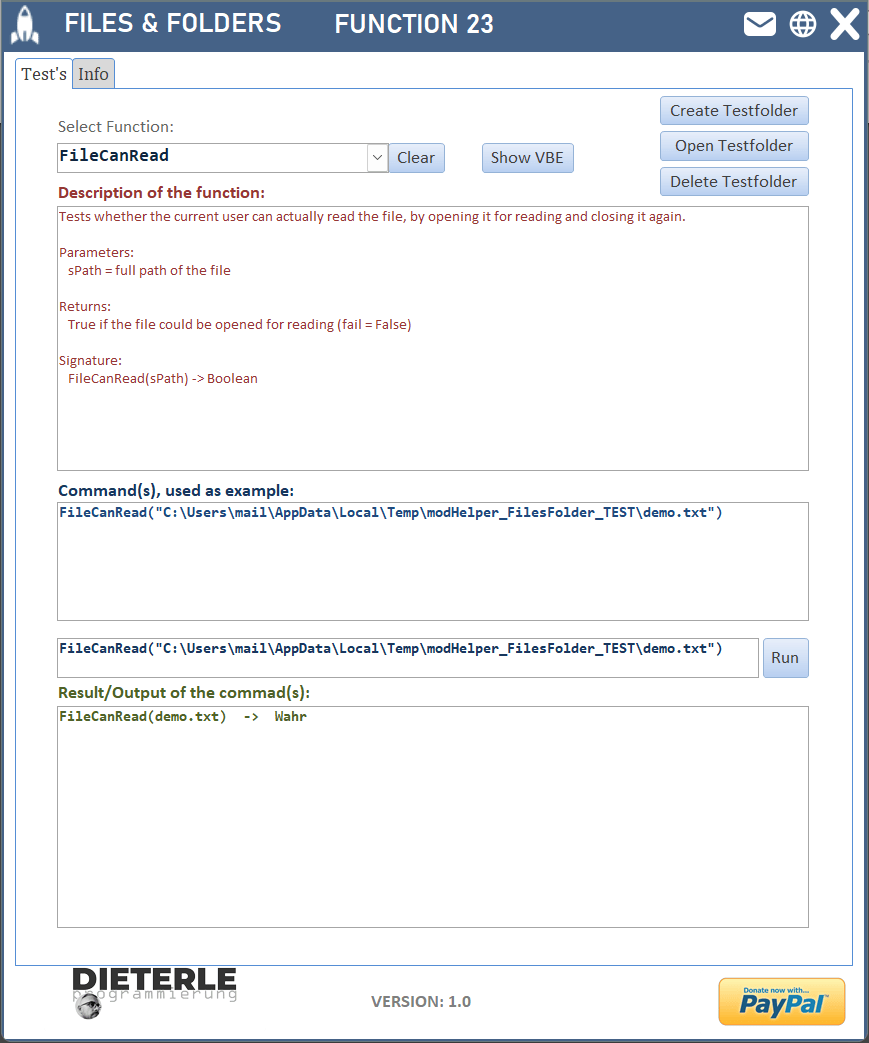 Besides RunTests there is the interactive test form frmFilesFolder_TESTING. It lists every function in a combobox (value list, filled on load). On open the form automatically creates a sandbox test folder under %TEMP%\modHelper_FilesFolder_TEST (with sample files demo.txt, lines.txt and a subfolder SUB) and deletes it again on close; a button re-creates it on demand. When you pick a function the form shows its full description (purpose, parameters, return, signature, notes) at the top and runs a safe demo inside the test folder below - the result appears in the output box. The 'Run' field lets you type and execute your own call; for data-changing functions (Delete, Trash, Move, Rename, Empty) a safety prompt appears first. The 'Show VBE' button jumps straight to the source code of the selected function. Important: every call made by the form works only inside the sandbox test folder under %TEMP%, never on real data or on C:\.
💡 What you really need in production
For production you only need ONE single module: modHelper_FilesFolder (the file modHelper_FilesFolder.bas). It contains every function plus the central ErrBox and works via late-binding - no references, no setup, 32- and 64-bit ready. NOT needed (pure development aids that do not have to be shipped): the module modHelper_FilesFolder_TESTING (RunTests and the demo engine), the class clsFilesFolder (output buffer for the form) and the form frmFilesFolder_TESTING. These three are only for trying out, testing and documenting. In short: in production modHelper_FilesFolder is all you need.
💥 Conclusion
With these functions your file and folder handling in Access becomes faster, more uniform and more robust - less boilerplate, fewer sources of error, more readability
🧪 Give it a try
The sample database contains the module and the form, ready to be imported. Give it a go – and if it saves you time, I’d be grateful for a small donation via the PayPal link. I look forward to your feedback.
📥 Download and Statistics


