

MAPEX — Marcus’ Access Permission Excellence
MAPEX is a permission system built specifically for Microsoft Access, designed to bring structure, flexibility, and control to user management.
It allows you to create users and groups, and define permissions across forms, reports, and all types of controls — giving you fine-grained access control within your Access applications.
Currently, MAPEX is in the beta testing phase. The core functionality is in place, and I’m actively refining, testing, and expanding its capabilities.
Want to see it in action?
Check out the videos and follow the development journey on my LinkedIn page for deeper insights and updates.
Curious or have ideas? Let’s connect — feedback and suggestions are always welcome.
BLOG
A client called me a few weeks ago. "Marcus, can you add permissions to our Access database? On Form, Report and Control level?"
They thought: 2 days.
Reality: 50+ hours.
Here's why:
EVERY control type is different.
A Button? Check .Visible and .Enabled
A TextBox? Check .Locked AND .Enabled (both!)
A ComboBox? Also check if they can see the dropdown list
A Report? Different events, different properties as a Form
You can't just write:
IF User = "Admin" THEN Allow
You need:
• User management
• Group architecture
• Permission storage
• Control-type detection
• Property manipulation
• Event handling
• Session tracking
• Audit logging
• Password security
• Performance optimization
For 50+ controls per form × 20 forms = 1000+ individual checks.
And that's BEFORE all the gotchas:
• DoCmd.Close crashes in Report_Open
• IsNull(Listbox) lies to you
• Performance dies after 50 controls
• Multi-group permissions break randomly
Ever faced this?
Here are the TOP 3 challenges you mentioned:
🔴 Multi-User Management
"I have 50 users in 8 different groups.
Every time I add someone, I have to check 20 different places."
🔴 Audit Requirements
"Compliance wants to know who accessed what, when.
I'm writing manual logging code everywhere."
🔴 Performance Issues
"My forms take 20+ seconds to load because I'm checking
permissions for every single control."
Sound familiar?
Here's what I learned from your responses:
Most solutions are REACTIVE.
User hits an error → You add permission check.
Another user hits error → Another check.
Repeat 100 times.
Result: Spaghetti code everywhere.
What if there was a PROACTIVE approach?
Define permissions once.
Apply automatically.
Audit built-in.
I'm working on something. More next week.
But first:
What's YOUR #1 permission headache right now?
After 20 years of VBA development...
After some of "can you add permissions?" requests...
After explaining the 40-hour reality over and over...
I'm building the solution I wish existed.
It's called APEX.
APEX - Access Permissions Excellence.
Not another framework that requires rewriting your entire database.
Not another "here's some sample code" tutorial.
A drop-in system for EXISTING databases.
Here's what it already does:
✓ Forms, Reports, Controls (15+ different types)
✓ User → Groups → Permissions architecture
✓ Bitwise permission calculations (no more random permission loss)
✓ Password security with SHA-256
✓ Configurable password complexity
✓ Full audit trail
✓ Session management
✓ Performance optimized (less than 1 seconds even with 50+ controls)
All the lessons from my Access development. All the gotchas I learned the hard way. Built into one system.
The permissive model:
Don't restrict everything. Only secure what matters.
Result: 90% less admin overhead.
The diagnostic tools:
See EXACTLY why a user has certain permissions.
Debug in seconds, not hours.
Integration:
Add SetFormPermission(Me) to Form_Load.
That's it. The rest is configuration.
Status: ~Week 13 of development.
It works. It's in testing.
What's left: some controls, Documentation, final polish, edge cases.
Expected: 4-5 more weeks.
Here's where YOU come in:
What feature would make this indispensable for YOUR projects?
Who is interested in becoming a beta tester?
Comment with your must-have feature.
(And yes, I'll share screenshots in a few days. The system is real. This isn't vaporware.)
A few days ago someone asked a critical question about APEX security:
"Can it be bypassed by someone with basic skills?" Great question.
Let me clarify something important. APEX is NOT your complete security solution. It's ONE layer of a two-layer system.
Think of it like a building:
🛡️ OUTER SECURITY (Layer 1):
The building perimeter. Walls, locks, access cards.
→ Prevents unauthorized file access
→ Windows permissions
→ Network restrictions
→ Database encryption
→ Split FE/BE architecture
→ .accde compilation
→ and more
This is YOUR responsibility as admin/developer. (Colin Riddington's security masterclass covers this brilliantly or Karl Donaubauer's & Philipp Stiefel's How (un) secure is Access)
🔐 INNER SECURITY (Layer 2):
What happens INSIDE the building.
→ Who can enter which room?
→ Who can open which cabinet?
→ Who can use which equipment?
This is what APEX does.
THE PROBLEM WITH OUTER SECURITY ALONE:
Scenario: You set a database password.
Everyone with that password has IDENTICAL access.
Bob the accountant = Same rights as Alice the admin.
No granular control. All or nothing.
THE PROBLEM WITH INNER SECURITY ALONE:
Someone copies your .accdb file to USB.
Opens it with a hex editor.
Reads raw data directly.
Bypasses ALL application controls.
THE SOLUTION:
Both layers working together.
OUTER blocks file access (Colin's approach).
INNER controls authorized users (APEX).
Not either/or. BOTH.
Defense in depth.
I'm writing a detailed guide on implementing both layers.
But this distinction needed clarification NOW.
Questions about the two-layer approach?
Security Masterclass link
How (un)secure is Access today?
Last week you asked about APEX.
"Is it real?"
"Can I see it?"
"When's it ready?"
Fair questions. Here's the proof.
Swipe through for screenshots →
What you're seeing:
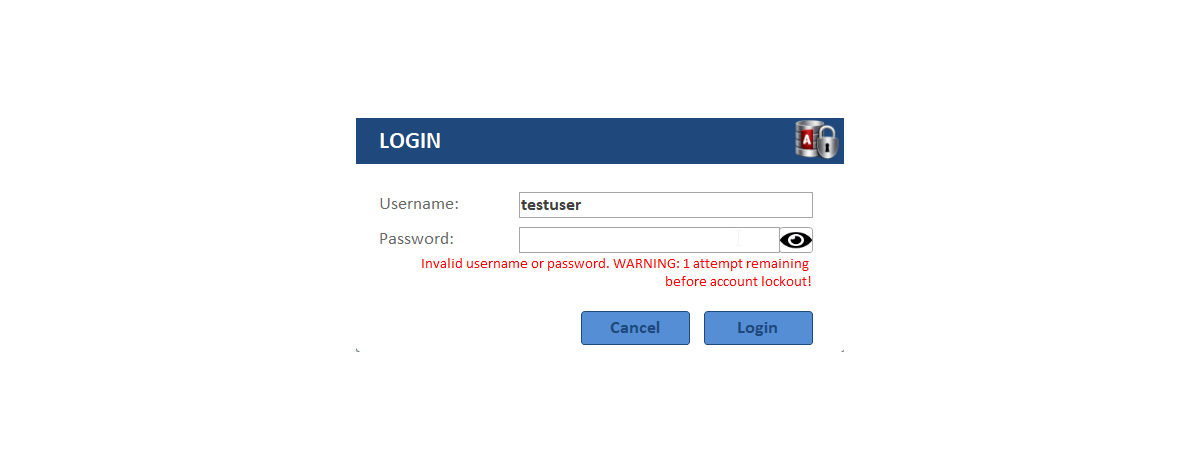
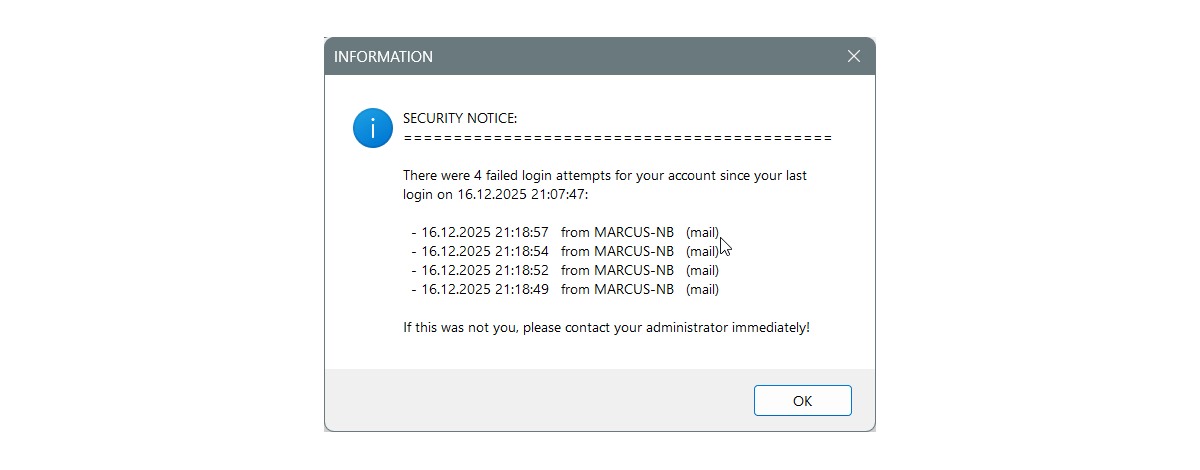
Picture 1: Login with failed attempt tracking
- Password masking toggle
- Attempt counter
- Account lockout warnings
Picture 2: Main testing interface
- Form/Report/Control permissions visible
- Real-time permission status
- Color-coded access indicators
- Easy to play and learn the permissions
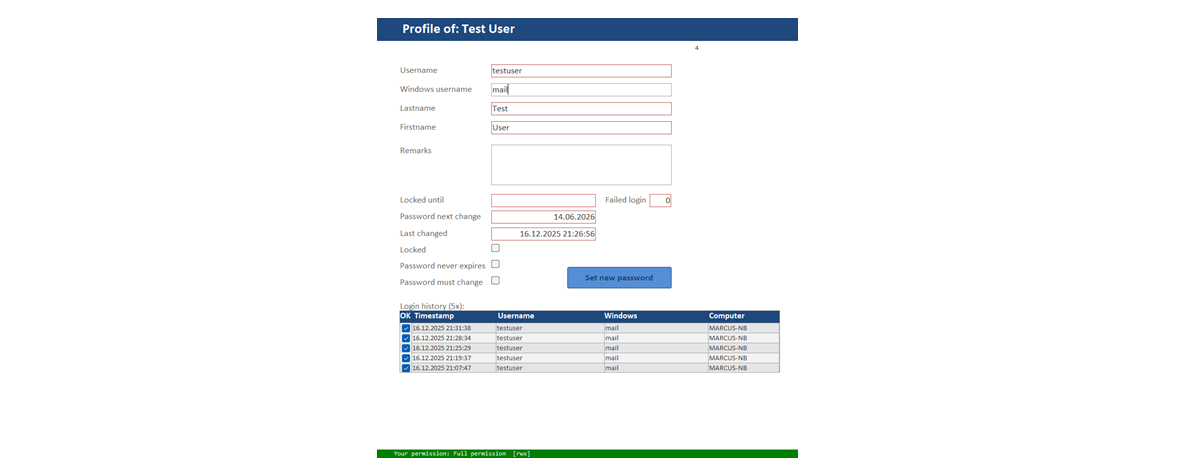
Picture 3: User profile management
- Password expiry tracking (read only)
- Login history (last 5x) (read only)
- Account lock controls (read only)
- Password never expires option (read only)
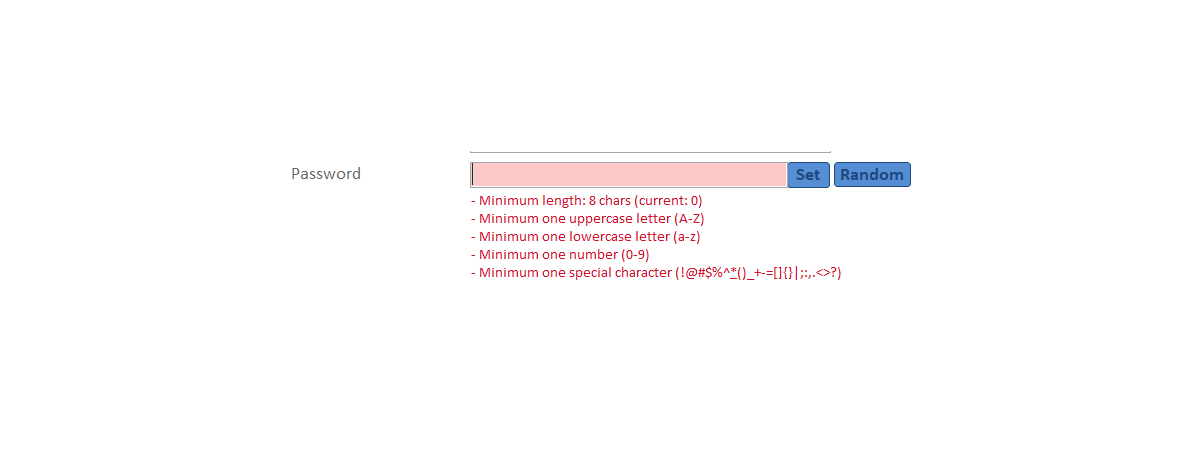
Picture 4: Password complexity validation
- LIVE validation as you type
- Specific requirement feedback
- Strength indicator
- Configurable rules
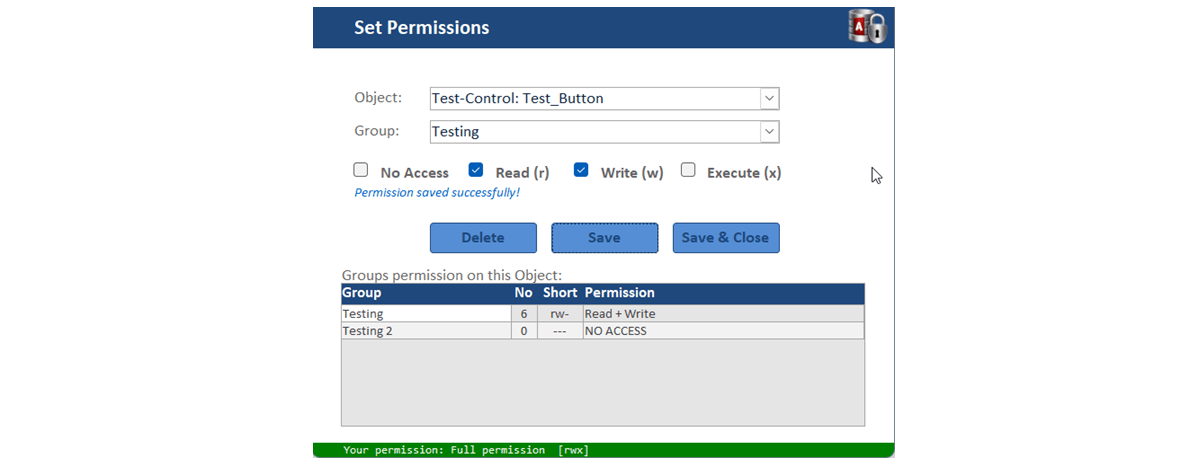
Picture 5: Permission setting form
- Set a permission for an Object to a Group
- Permission status for each (r--, rw-, rwx or ---)
- Displaying all group-permission on chosen Object
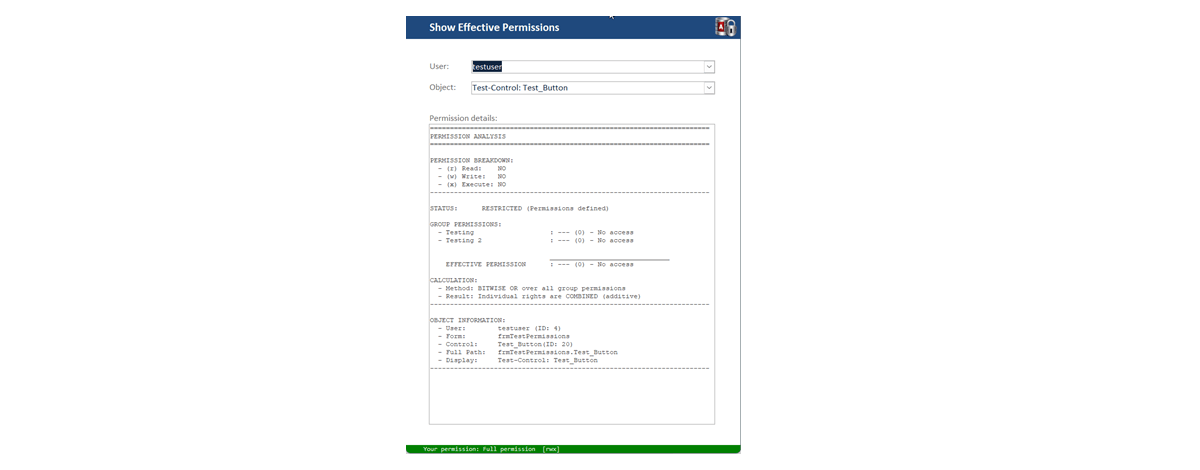
Picture 6: Diagnostic tool
- Shows EXACTLY why user has X permission
- Permission breakdown
- Bitwise calculation shown
- Troubleshooting in seconds
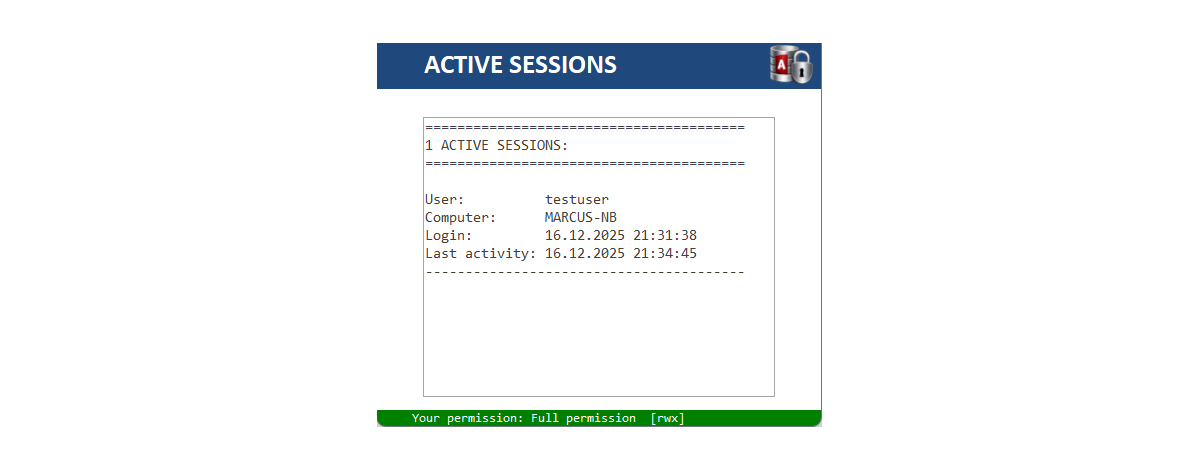
Picture 7: Active sessions
- Who's logged in right now
- Computer name, timestamp
- Session management
- Sessions are needed for audit
This is what 13 weeks of development looks like.
Every gotcha learned.
Every edge case handled.
Built for the Access community.
Building in public means sharing the wins.
It also means sharing the "oh no" moments.
Here's mine:
WEEK 13 UPDATE: NAME CONFLICT
After weeks of calling this project "APEX", I was told that this name is taken already, and I did my trademark research this week.
Result: APEX is... everywhere.
🔸Oracle APEX (Application Express) - since 2000
🔸Salesforce APEX - registered trademark
🔸Apex Software Technologies - HR software
🔸Amazon APEX - patent evaluation
🔸+ 55 more (only software).
Rookie mistake? Maybe.
But this is exactly why I build in public.
Better to discover this NOW (before launch) than AFTER I've shipped to users.
THE QUESTION:
Do I stick with "APEX - Access Permissions Excellence" despite the crowded field?
Or pivot to a unique name that stands out?
I'm leaning toward pivot.
Here are 4 alternatives I'm considering:
🔸ACORD (Access Control & Rights Definer)
🔸PERMATE (PERMissions Administration Tool for Entitlements)
🔸PERMISE (PERMissions Interface for Security & Entitlements)
🔸ACCESSIFY (Access Control Center for Entitlement Security System Interface For Your projects)
🔸Your idea?
I need community advice.
You've followed this journey for a while.
You've shaped features through feedback.
Now help me name it.
Comment your opinion.
(And yes, I'll verify trademarks this time 😅)
"How does APEX actually work?"
Got this question a few times last weeks.
Fair. I showed you screenshots. Now let me show you the architecture.
Swipe through for the technical breakdown →
Picture 1: The Big Picture
Users → Groups → Permissions → Objects
Not reinventing the wheel. Using proven patterns.
Picture 2: The Permissive Model
Default: Allow everything
Only restrict critical items
Result: 90% fewer rules to manage
Picture 3: Bitwise Calculations
Why OR instead of MAX
Binary math in action
Keeps ALL permissions from ALL groups
Picture 4 & 5: Password security
SHA-256 encryption
Configurable password complexity
Live validation of the PW complexity while typing a new password
Password history
Picture 6 & 7 Login - Checks
The check-flow of a login attempt
Picture 8: Session Management
TempVars + Backend Tables
Survives VBA limitations
Audit trail built-in
Picture 9: Audit Trail Structure
Who, What, When, Where
Every permission check logged
Compliance-ready out of the box
I’m happy with all feedback. It helps me to learn and add more functions.
P.S. I'm still thinking about a new name. Thank you all for your ideas.
Week update & a name decision.
First: THANK YOU.
Last week's naming post got 20+ comments.
So many creative suggestions.
MSAPEX, PCAD, PermAcc, CAPE, ACCEPTAPEX, ...
The creativity blew me away.
But here's what happened:
I really loved APEX.
13 weeks of building with that name. It felt right.
Then Ozzie O suggested MAPSys Marcus’s Access Permission System. I liked to add my name into it. That’s brilliant.
So here it is:
📢 MAPEX - Marcus' Access Permission Excellence
Keeps APEX. Adds personal touch. Legally clean. Community-inspired. Perfect.
Now, the work the last week:
💪 ACTIVE DIRECTORY INTEGRATION
Colin Riddington (Beta Tester) suggested AD authentication. Done.
Three login modes now:
- Active Directory (Windows)
- Local Users (database accounts)
- Hybrid (both supported)
👍 PERFORMANCE OPTIMIZATION
Login checks now 20% faster.
✌️ LOGIN SEQUENCE IMPROVED
Better error messages. Clearer warnings and informations.
☝️ DEBUG FUNCTIONS ENHANCED
Better debug outputs. Logs all code flow steps in the immediate window. Can be deactivated.
👉 MINOR FIXES
Edge cases. ComboBox quirks. Report permissions.
And testing. Testing. Testing.
3 authentication modes.
50+ different scenarios.
15+ control types.
100+ permission combinations.
Questions about AD integration?
Or anything else?
Building in public = building WITH you.
Thanks for being part of this.
Do 80% Really Equal Only 50% of the Journey?
If you’ve ever built software, you probably know this feeling. The first 80% fly by.
Core features come together quickly. The architecture takes shape. You can finally see your product working. Progress feels tangible. Motivation is high. Big steps, big wins.
And then… the last part begins. Suddenly, the finish line starts to move.
What looked like a straight release path turns into a maze of branches:
Bugs appear in places you thought were solid.
Small improvements trigger changes across multiple modules.
Performance tuning uncovers deeper structural issues.
Logic flaws surface only when real scenarios are tested.
Documentation takes far longer than expected—and while writing it, you discover problems you hadn’t even noticed before.
New ideas emerge precisely because you now understand the system better.
Every “tiny” change seems to ripple through the entire codebase.
The progress curve changes shape.
Those early 80% felt fast and rewarding.
But the remaining 20%? They often take just as long—sometimes longer.
Why?
Because this phase isn’t about building anymore. It’s about refining.
It’s the phase of:
* Edge cases
* Stability
* Maintainability
* Usability
* Performance
* Documentation (for users, admins, and developers)
*And countless small decisions that define product quality
You move from giant leaps to small, careful steps.
Motivation can dip here. The visible progress slows down. The tasks feel less exciting. You’re no longer creating shiny new features—you’re polishing, fixing, restructuring, and questioning earlier assumptions.
But this is also where real software engineering happens.
This is where complexity shows its true face.
This is where products mature.
This is where “it works” becomes “it works reliably, understandably, and sustainably.”
So maybe the question isn’t:
“Why do the last 20% take so long?”
Maybe it’s:
“Were we ever really at 80%?”
In my experience, that early “80% done” is often closer to being halfway there.
The remaining work is just harder to see, harder to estimate, and harder to celebrate.
And yet—it’s the part that makes all the difference.
I’d love to hear from you:
* Have you experienced this in your own projects?
* Does the last stretch also feel endless sometimes?
* How do you stay motivated during that phase?
When Real Life Hits Your 80% (Which Were Really Only 50% Anyway)
Remember my last post about the final 20% of a project taking just as long as the first 80%?
Well, here's the plot twist: Sometimes life adds another layer to that equation.
The last few weeks were... eventful:
🤒 Got sick
✈️ Business trip
🏖️ Vacation
💼 Another project demanded attention
And just like that, MAPEX development hit pause.
It's a good reminder that even when you're "almost done," the finish line can still move—not just because of technical complexity, but because we're humans with lives outside our code.
So where does MAPEX stand now?
The good news: The core is solid. The beta testers have it. The foundation is done.
The reality check: There's still real work ahead.
What's left on the list:
✅ Rights management for SubForms, Attachments, NavigationControls, and NavigationButtons
✅ Rework the user deletion logic
✅ Auto-clean function for audit trails
✅ Overhaul Admin and Developer documentation
✅ And the big one: Test, test, test (waiting on beta tester feedback)
Looking at this list, I realize: Those "first 80%" I mentioned? They might have been 50% after all. 😅
But here's the thing: I'm not frustrated. I'm energized.
Because every pause gives you perspective. Every distraction forces you to return with fresh eyes. And every delay is an opportunity to do it right instead of just done.
MAPEX will be ready when it's ready—and it'll be better for it.
To everyone building something right now:
Life will interrupt. Projects will pause. Progress won't be linear.
And that's okay. That's normal. That's real development.
The question isn't whether you'll get interrupted.
It's whether you'll come back. I'm back. 💪
🔐 MAPEX in Action — Watch the Demo! 🎬
Weeks of building in public — now it's time to SHOW you what MAPEX can do. Hit play!
What you'll see:
→ The full login process with failed attempt tracking & automatic account lockout
→ Three authentication modes: Local User (SHA-256 hashed), Active Directory (with intelligent offline fallback), and Emergency User — a recovery backdoor for when everything goes wrong
→ Active session monitoring — see who's logged in right now
→ Password changes with live complexity validation — length, special chars, and more — all configurable without touching code
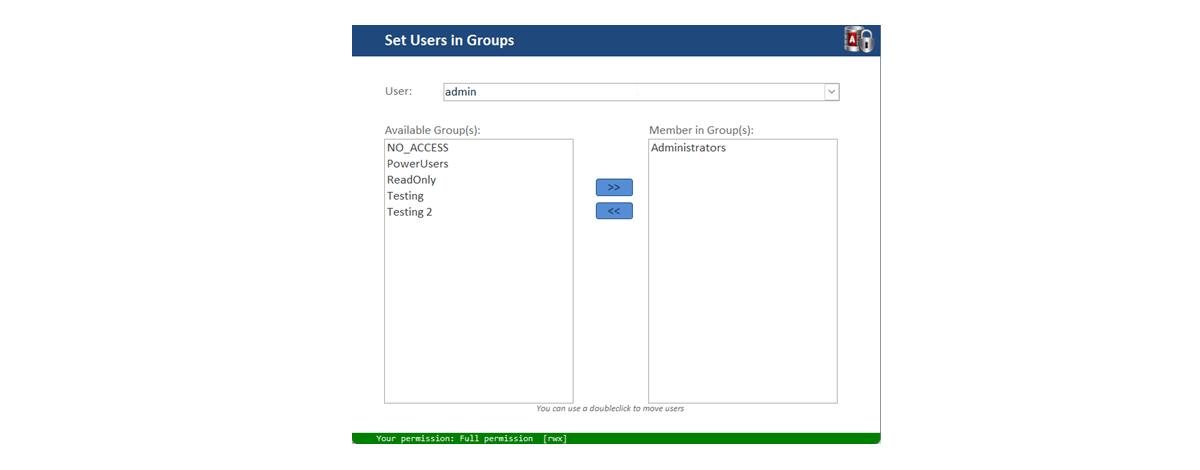
→ User & Group management — creating users, assigning them to groups in seconds
What's running under the hood:
A comprehensive Audit Trail logs every security event — Enterprise-grade compliance built right into Access.
All built in VBA. All ready to integrate into YOUR Access database.
Beta testing is coming soon. 🚀
🔐 MAPEX in Action — Part 2: Permissions from Scratch! 🎬
Remember the first demo? Login, lockouts, authentication modes, audit trail — the security backbone.
Now let's build on top of that.
This time you'll see the full permission workflow — start to finish:
🔸 Creating a new user
🔸 Creating a new group
🔸 Adding the user to that group
🔸 Registering an object in MAPEX
🔸 Assigning permissions to the group for that object
That's it! That's how fast you go from "no access control" to "enterprise-grade permissions" — all inside Microsoft Access.
Meanwhile, behind the scenes: I've been grinding on the Administrator Guide and Developer Guide this week. Together they're already 80+ pages of documentation — and growing. Because a security system without proper docs isn't a security system. It's a liability.
Beta testing still needs to be done. 🚀
All built in VBA. All ready to integrate into YOUR Access database.
🔐 MAPEX Beta — I need your help.
A few weeks ago I opened up the MAPEX beta. Some of you signed up, got full access to the database — and I appreciate every single one of you.
But here's the honest truth: I've received exactly one piece of feedback so far.
I get it. Life's busy. But MAPEX can't get better without real-world testing and honest feedback. Even on hour of clicking around and telling me what confused you, what broke, or what felt wrong — that's gold.
If you already have access: Please give it another look. DM me anything — bug reports, questions, "this button makes no sense" — all of it helps.
If you haven't signed up yet: Now's the time. You'll get the complete database, ready to explore. The Administrator Guide and Developer Guide are already 80+ pages combined — so you won't be flying blind.
What is MAPEX?
🔸 A full permission & security system for Microsoft Access
🔸 User & group management, form-level permissions, audit trail
🔸 Three authentication modes including Active Directory
🔸 Built entirely in VBA — plug it into your own database
This is a real tool solving a real gap in the Access ecosystem. Help me make it bulletproof.
DM me to join the beta. 🚀
🏖️Development Pause
+ Waiting for beta tester feedback
+ Smart suggestions coming in
+ This is why beta testing matters
📢 MAPEX LIVE DEMO
+ Access DevCon April 16, 2026
+ Karl Donaubauer's Conference
+ THE event for Access developers
+ 2 days, expert sessions
📝Registration still open
DonKarl's DevCon
See you April 16?
Beta testing is humbling.
Five testers.
Five different perspectives.
Five sets of "I never thought of that" moments.
MAPEX has been in beta for a while now. And the feedback? Gold so far. Here's what I'm implementing based on tester input:
1️⃣ MODULE/CLASS/FORM PREFIXES
Tester feedback: "When I import MAPEX into my project, I can't tell which modules are yours vs mine."
Solution: Proper prefixes (mod, cls, frm) for all objects. Makes integration into existing projects cleaner.
2️⃣ CLEARER AD VS LOCAL USER DISTINCTION
Profile form didn't clearly show whether user is Active Directory or local database account.
Now: Clear visual separation. No more guessing.
3️⃣ LOCALIZED TIME DISPLAY
Failed login attempts showed time in my format. Not the user's locale settings.
Fixed: Respects regional settings.
German users see German format. US users see US format.
4️⃣ "CLOSE APP" MENU ENTRY
Obvious in hindsight.
Users asked: "How do I exit properly?"
Added explicit "Close Application" menu item.
Small change. Big UX improvement.
5️⃣ THINGS I DIDN'T SEE
This is the developer blindness problem:
You build. You test. You think it's complete.
Then users show you edge cases you never considered.
More improvements coming from tester feedback.
To my Beta-Testers
Phil Graham, Bert Hoekstra, Susan Kennedy, Daniel Sanders, Alex Karasyov
Thank you for your time and expertise. Your feedback is literally reshaping MAPEX for real-world use. And if you have MORE feedback: bring it. Every insight makes this better. Building with users > building alone.
Even THE GUI GUY needs a break sometimes! 😎
So I’m heading to the other side of the world — Australia! 🇦🇺
For the next few weeks it’s going to be motorcycles, great people, good drinks and hopefully a few adventures along the way. 🏍️🍻
Which means: no new articles, no coding, and definitely no “quick little fixes.” 😉
The keyboard can wait. The open road can’t!
See you on the other side! 🤘
Login
Managing Permissions
First glance